A media player and a word filter
It mutes what you don't want to hear.
SubHush is both: a media player for your own movies and shows, and a word filter that mutes bad words while they play. Guided by the subtitles, it silences only the words you choose. Nothing skipped, nothing cut, no bleeps. Just quiet where the word was.
- No subscription
- No account
- Works offline
- Files stay on your device
I told you, we are not going back there.
What the **** was that noise?Muted
How it works
Subtitles do the listening. SubHush does the muting.
Parents: protect your children's ears on family movie night. Movie lovers: if you love the films but do not appreciate the language, SubHush keeps the story whole while taking the words out. The filter applies to language in the audio only. It does not filter scenes or pictures.
Point it at your library
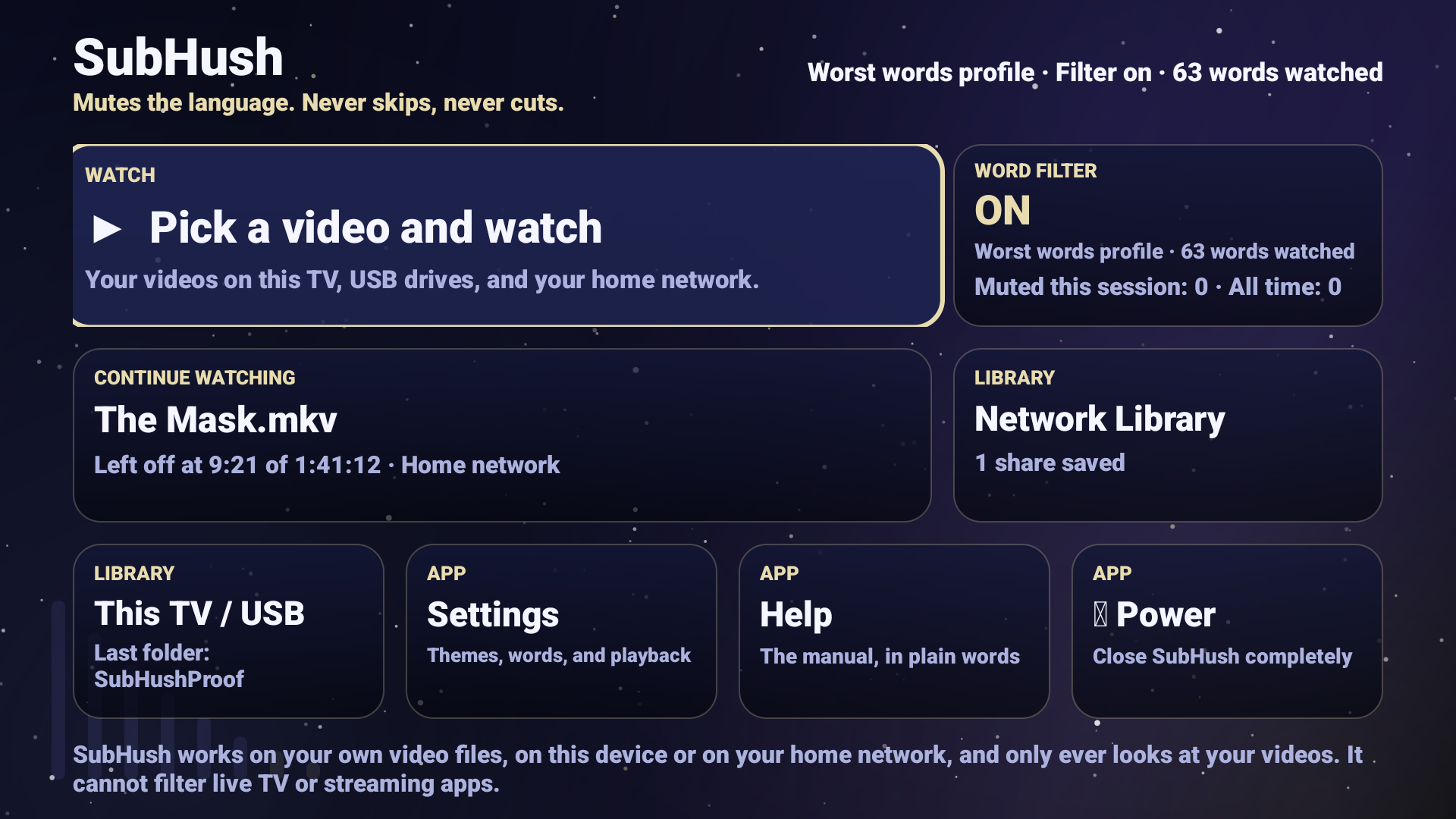
Open a video from a USB drive, from this device, or from a share on your home network. If you run Jellyfin or Plex, point SubHush at the same folders and your collection is on screen, ready to watch.
It reads the subtitles
Before the movie starts, SubHush finds the subtitle track inside the file, or the subtitle file sitting beside it, and checks it against the words you chose. If a title has no usable subtitles, it tells you plainly instead of pretending.
It mutes only the words
When a chosen word arrives, the volume dips for that moment and comes right back. The picture never changes, the scene never jumps, and nothing on disk is edited.
The SubHush difference
It mutes. It never bleeps, skips, or cuts.
Other tools beep over the dialogue, skip whole scenes, or rent you an edited copy of a movie you already bought. SubHush does one quiet thing instead.
No bleeps
A dip, not a tone
A bleep announces itself and pulls everyone out of the scene. A short dip in volume passes almost unnoticed, and the moment keeps its rhythm.
No skipped scenes
The whole film, whole
Nothing is cut from the picture or the timeline. You see the entire movie, start to finish, minus the words you chose.
No edited copies
Your files stay yours
SubHush changes nothing on disk. It only rides the volume while you watch, on your device, and your originals stay original.
You choose the words
Start with the worst. Add only what you want.
Six built-in word packs
One hundred sixty words, sorted into packs so you can take a little or a lot.
Every word in every pack can be switched on or off on its own.
Your list, your call
- Start with the worst words only, then stack more packs on top
- Add your own words, or run on your own list only
- Adjustable padding, so a word is covered even when subtitle timing runs a little loose
- A muted badge and a per-title counter show every mute as it happens
- One tap turns filtering off and gives you plain playback
Made for the room it plays in
Four themes, one calm screen.
Big tiles, plain labels, and nothing that glows at you from across the room. Pick the palette that fits your screen.
Deep Sea
Deep teal and gold. Easy on the eyes in a dark room.
Cinema
Warm charcoal and amber, like the lobby before the show.
Midnight
Deep indigo with a violet accent, for late sessions.
Starlight
A night sky for the biggest screen in the house.
Three editions
One player, everywhere your movies live.
SubHush for Android
For Android TV, phones, and tablets. The full library view, all six word packs, and all four themes. Current version 1.2.1.
$24.99
One payment. No subscription.
Sold through Pontos Brands today, while the subhush.com store is being finished. One requirement, stated up front: a title needs subtitles to be filtered.
SubHush for Windows
The same mute-only engine for the Windows PC, on the desk or in the living room.
$29.99
Planned price. Founding price $19.99.
SubHush for Linux
Follows Windows on the same desktop codebase, packaged for common distributions. A media PC is where SubHush feels most at home.
$29.99
Planned price. Founding price $19.99.
Pricing
One payment. No subscription, ever.
Every filtering rival charges by the month. SubHush runs entirely on your device and costs nothing to keep running, so it is sold the honest way: once.
Each edition
$19.99 to $29.99
Android is $24.99. Windows and Linux are planned at $29.99 each. Every 1.x update is included, and the version you own keeps working for good.
SubHush Household
$59.99 for all three
One license for the whole house: every edition, up to five devices per edition. Less than a single year of any filtering subscription.
Founding offer
$39.99 for the bundle
For the first 250 buyers, the household bundle is $39.99 and single editions are $19.99. Joining a notify list holds your founding price for 14 days after that edition launches.
Straight answers
Questions, answered plainly.
Does SubHush work with Netflix or other streaming apps?
No. Streaming services do not share their subtitle files or give outside tools control of their sound, so nobody can filter inside their apps. SubHush is built for the library you own. If you need streaming filtered, ClearPlay and VidAngel are the right tools for that job.
Does it bleep, skip, or cut anything?
No. It only lowers the volume at the moment a word you chose is spoken, then restores it. The picture, the scenes, and the running time are untouched, and it filters language only, never images or scenes.
What does a video need for SubHush to filter it?
Subtitles with the dialogue in text form. That means a subtitle file beside the video (such as .srt or .vtt), or a text subtitle track inside the file. Picture-based tracks, like the PGS subtitles on many discs, cannot be read and are labeled not filterable.
What if a movie has no subtitles at all?
Then SubHush cannot filter it, and it says so on screen before you press play. That is the one hard requirement, and we would rather state it here than surprise you after you pay.
Which video files can it play?
On Android, the standard formats your TV or phone already handles, including MP4 and MKV. If the device can play it, SubHush can ride along and filter it.
Where do my movies stay?
Right where they are: on your device, a USB drive, or a share on your home network. Playback and filtering happen on the device itself. Nothing is uploaded, and SubHush has no account system and keeps no viewing history. See the privacy page.
Can I pick exactly which words get muted?
Yes. Six built-in packs cover the common ground, every single word can be switched on or off, and you can add your own words or run on your own list only. Turning filtering off entirely is one tap.
Your movies. Your standards.
Get SubHush for Android today, or join the Windows and Linux lists and hold your founding price until your edition ships.